 Novametrics
Finally know if your store
is actually profitable.
Most dropshippers and ecommerce store owners watch revenue, not profit. Novametrics pulls your Shopify sales, ad spend, product costs and fees into one view, then tells you in plain words what the numbers mean and what to do next.
The problem
Every platform shows you a number. None of them is your profit.
Meta knows your ad spend, Shopify knows your sales, and nobody puts your costs next to them. So the big decisions get made without knowing what you kept.
Meta says
2.1× ROAS today
Good or bad? Meta can't tell youMeta doesn't know your product cost, shipping or fees, so it doesn't know your break-even. The same 2.1× is a great day for one store and a loss for another.
Shopify says
€1,240 in sales
What did you keep? Not shownShopify knows your orders, not what you paid Meta and Google today. Revenue is the number you look at, not the number you keep.
Your gut says
Raise the budget
How low can ROAS go? UnknownMore budget almost always means lower ROAS. The real question is how far it can drop before you make less money than today. Without that number, scaling is a guess.
Novametrics says
See it in action
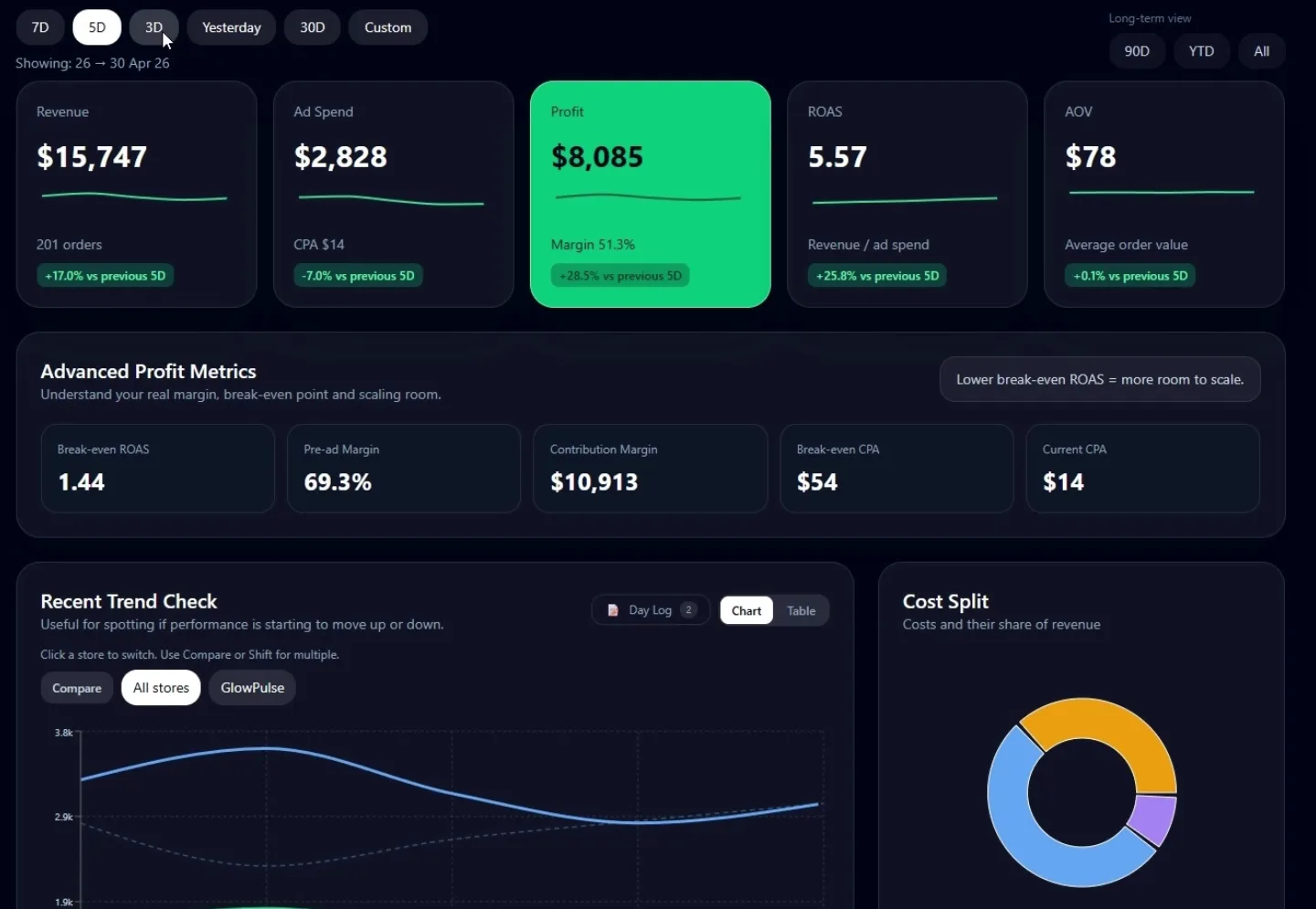
Your whole business, on one screen.
Profit, ROAS, margin and every cost, per day and per store. Plus a clear read on what it means.
Dashboard overview: profit, insights and calculators.
How it works
Three steps. No spreadsheet.
You bring the exports you already have. Novametrics does the math and the thinking.
Bring in your numbers
Upload the Shopify, Meta and Google CSV exports you already have, and Novametrics finds the columns itself. Add your product costs once and they are used on every order. Or type in a day by hand.
CSV import: Growth. Manual entry: every dashboard plan.
See what you actually kept
Product, shipping, fees and ad spend all come off. You get net profit, ROAS, margin, CPA and AOV per day and per store, in your own currency.
Every dashboard plan.
Know what to do next
Smart Insights read the numbers for you: when you are losing money, when profit is trending down, and when ad spend grows faster than revenue. On Growth, AI also judges it against your own profit target.
Smart Insights: every dashboard plan. AI analysis: Growth.
Watch a full import, start to finish
Shopify orders, Meta ads and Google ads, including product costs.
Insights
It doesn't just show numbers. It tells you what they mean.
Every insight in Novametrics starts from rules, not from a chatbot. Smart Insights come with every page you use. On top of that, AI goes deeper.
1Smart Insights: on every page you have
Dashboard · Starter, Growth
Your store, read for you
Flags the moment your numbers change: losing money, ROAS trap, thin margin, ad spend growing faster than revenue.
Calculators · all plans, incl. Free
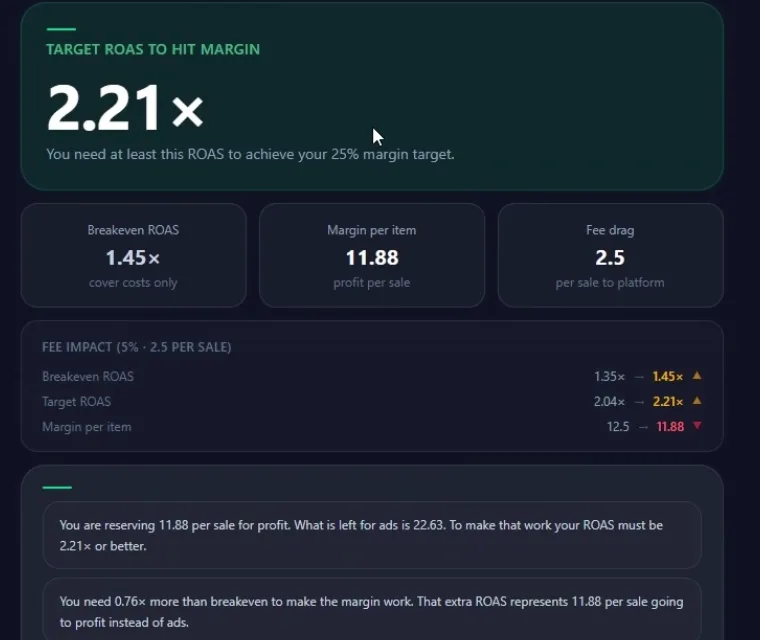
Results that explain themselves
Under every result you get what it means in plain words: the target to hit, the gap, what moves it.
Bundle analytics · Growth
Bundle and add-on tips
From your Shopify orders: which bundle sizes sell, how often add-ons get picked, where the next order value is.
2AI on top: the upgrade
Dashboard · Growth
Smart Insights + AI analysis New
Your Smart Insight panel gets an upgrade. AI reads the same numbers against your own profit target and tells you what is happening, why, the one thing to do, and how far you can scale. If there is too little data, the Smart Insights stay as they are.
Every calculator · Tools, Starter, Growth
AI feedback on your result
One tap under any calculator: AI looks at your numbers and adds its own analysis, beyond what is on screen. 50, 100 or 250 a month depending on plan. The built-in explanation is always there.
3Your numbers in Claude
Claude connector · Growth
Keep the conversation going, as long as you like
Talk to Claude about your numbers with no Novametrics limit on questions, run any calculator, and import or correct your data by chat. It runs on your own Claude account. More about it below.
AI analysis, up close
Reads your store the way an experienced operator would.
Every day, AI reads your store's numbers and writes you one to three points in plain language: what is happening, why, and what to do about it.
- 1The math is done before the AI sees itNovametrics calculates every number first. The AI only interprets them, and a checker throws out any answer that contains a number it wasn't given.
- 2Judged against your own targetSet the profit margin you want per store. The advice changes with it: the same numbers can mean "scale" for one store and "fix margin first" for another.
- 3Tells you how far you can pushHow low ROAS can go, or how high CPA can climb, before you drop below your target. The most useful number when you want to scale.
- 4Built on real experienceThe AI follows a rulebook written from 15+ years in finance and years of marketing and running stores, not generic marketing advice.
Included in Growth.
You are 6 points above your 18% target. Net margin is 24% after product, shipping, fees and ad spend. You have room to raise budget, in steps, not all at once.
Your scaling room: ROAS can fall to 2.6×, or CPA rise to €14.10, and you still hit 18%.
Judge on Shopify, not Meta. Meta shows 31 purchases this week, Shopify 38 orders. Don't turn off ads on Meta's numbers alone.
Claude connector
Your numbers in Claude. Ask, calculate, update.
Connect Novametrics to your Claude account and talk about your store in plain words. Claude answers from your own numbers, and Novametrics opens right next to the chat.
Included in Growth. You need your own Claude account.
- 1Ask anything, as often as you like. "How did my store do last week, and can I scale?"
- 2Run any calculator. "What's my break-even ROAS if I raise the price to €44.95?" The calculator opens with your numbers filled in.
- 3Add or correct numbers, with a note. "Add €200 as an influencer fee to yesterday." You see a preview first, nothing changes without your yes, and it can be undone.
- 4Ask why. "My break-even went from 1.56 to 1.62. Was it worth it?"
A real session with the Novametrics connector.
What you get
Everything you need to run your stores on real numbers.
Daily profit dashboard
Net profit, ROAS, margin, CPA and AOV per day, week and month. See exactly what you kept after every cost.
AI insights
Plain-language analysis of your numbers every day, judged against your own profit target.
Multiple stores
Every store gets its own profit view and target. Compare them side by side and see which one deserves the budget.
Every cost, split out
Product cost, shipping, payment and platform fees, and other costs. Nothing hides inside one big number.
Multi-currency
Sell in SEK, pay ads in USD, see everything in EUR. Rates are stored per day, so old numbers never shift.
Bundle analytics
See which bundles your customers actually buy and what each one earns you per order, straight from your Shopify orders.
Profit calculators
12 calculators built for dropshipping and ecommerce decisions.
Test a product, price a bundle, set a budget, check how far you can scale. Three are free forever, Q4 Budget is free until 4 Dec, and the rest come with every paid plan.
Breakeven ROAS
Enter price and product cost, see if the margin can carry paid ads.
FreeTest Budget
How much you need to test a new product or campaign properly.
FreeIncome Goal
Turn a monthly income target into daily revenue per store.
Free until 4 DecQ4 Budget
How much cash you need to carry your November goal through Black Friday.
Scale Ceiling
Before you raise budget, see how far ROAS can fall and still earn the same.
Bundle Calculator
Price 1x, 2x and 3x offers and see the margin on each.
ROAS & Margin
Set a margin target, get the ROAS your campaigns need.
CPA & Margin
Work backwards from a margin to your maximum CPA.
ROAS Scenario Table
The ROAS you need for your target margin, and what every ROAS level leaves you per sale.
Campaign Profit
What conversion rate a sale or price increase needs to earn the same.
Profit Estimator
Estimate profit from any two of sales, ad spend or ROAS.
Quotation Tracker
Compare supplier quotes, bundles and markets with break-even built in.
Built by an operator with a finance background, not a software team.
I spent more than 15 years in finance, as a manager, coach and educator. Then I started running my own stores, and today I also teach dropshipping at EM Academy. The same thing kept happening, to me and to the people I coach: the ads looked profitable, Shopify looked busy, and at the end of the month there was less money than there should have been.
In finance you never judge a business on revenue. You look at what is left after every cost. Every ecommerce tool I tried showed a different number, and none of them showed profit. So I built the one I wanted. It counts every cost, and it reads the numbers the way I would if I were looking over your shoulder.

Learn the numbers
Free walkthroughs on YouTube
Short, practical videos on reading your numbers and making the call.
Pricing
Simple, honest pricing.
Start free with 3 calculators, no card needed. Upgrade when your store needs more. Cancel anytime.
Free
For checking a product before you spend on it.
€0
Free forever
- Breakeven ROAS calculator
- Test Budget calculator
- Income Goal calculator
- Q4 Budget calculator, free until 4 Dec
Tools
For operators who want every calculator.
€19/mo
- All 12 profit calculators
- AI feedback on your results (50 a month)
- Every new calculator, included
- Scale Ceiling, bundles, CPA and more
- Cancel anytime
- What's in Tools →
Starter
For one store that needs a real profit view.
€39/mo
7-day free trial
- 1 store
- Daily profit, ROAS & margin
- Smart insights
- Cost split, fees included
- All 12 calculators
- AI feedback on your results (100 a month)
- Manual data input
- Extra stores €15/mo each
Growth
For operators running several stores and ad accounts.
€99/mo
Everything in Starter, plus:
- 3 stores
- AI analysis of your store against your own profit target
- Your numbers in Claude: ask, calculate, update (Novametrics connector)
- AI feedback on your results (250 a month)
- Shopify, Meta & Google import
- Multi-currency with live rates
- Multiple ad accounts per store
- Bundle analytics
- Full day log history
- Extra stores €15/mo each
All prices excl. VAT.
FAQ
Common questions
How is profit actually calculated?
Revenue minus every cost: product cost, shipping, payment and platform fees, other costs and ad spend from Meta and Google. You control each cost, so the numbers match your business, not a generic template. From that you get net profit, ROAS, margin, CPA and AOV.
Is this different from Shopify's own analytics?
Yes. Shopify shows sales and orders, but it doesn't know what you spent on ads or what the products really cost you. Novametrics combines all of it and shows what you actually kept.
What does the AI do?
On every paid plan, each calculator can explain your result with AI: what your numbers mean together and what to do next (50, 100 or 250 times a month, depending on your plan). On Growth, AI also analyses your store's daily numbers against your own profit target. The app calculates every number; the AI only explains them.
Can I trust the numbers in the AI insights?
Every day the AI reads your store's numbers and writes one to three short points: what is happening, why, and what to do. Novametrics calculates every number first; the AI only explains them. Before an insight is shown, a checker compares every number in the text with your data and throws the answer away if anything doesn't match.
What is the Claude connector, and do I need a Claude account?
On Growth you can connect Novametrics to Claude, the AI assistant from Anthropic. Then you can ask about your numbers, run any calculator, and add or correct a day's numbers, always with a preview you confirm first and an undo. You need your own Claude account for this: the conversations run on your Claude plan, not on Novametrics.
Do I need to connect anything to start?
No. You can type in a day by hand from the first minute. Shopify, Meta and Google imports are on Growth and work with the export files you already download from those platforms.
What if I have more than one store?
Starter covers 1 store, Growth covers 3. Need more? Add extra stores for €15/mo each on either plan. Each store gets its own profit view and its own profit target, and you can compare them side by side.
How does the free trial work?
Starter comes with a 7-day free trial. A card is needed to start it, and you aren't charged until the trial ends. Cancel before then and you pay nothing. The free plan with 3 calculators needs no card at all.
Can I cancel anytime?
Yes. Cancel from your account settings whenever you want and keep access until the end of the period you paid for.
Get started
Stop guessing. Start knowing your numbers.
Create a free account in under a minute. Upgrade when your store needs more.
No card needed for the free plan.